Frontline
TIMELINE
TreeHacks 2026
Stanford University Hackathon
February 13th - 15th
Total: ~36 hours
TOOLS
React Native
TypeScript
HTML/CSS/JavaScript
Node.js
Zoom SDK
Claude/Perplexity AI
Render
Git
MY ROLE
Team of 4 Students
Worked on frontend development (operator dashboard and iOS app) and computer vision system
HACKATHON DETAILS
Track Chosen: Zoom x Render (Main Track), Human Flourishing, Anthropic, The Interaction Company of California, Perplexity
Prompt
Build something that feels alive using Zoom and Render in this joint track! Use Zoom APIs and SDKs to tap into real time human moments like live meetings, voice, video, chat, or events. Couple it up with Render to instantly deploy and scale the backend that powers your idea. Your app should react while people are talking, collaborating, or presenting in the moment. Think about what becomes possible when live Zoom data triggers logic, automation, or media in real time. Turn conversations into meaningful and impactful experiences!
PROBLEM SPACE
The current emergency response pipeline depends heavily on verbal communication between callers and dispatch operators. However, this process introduces several challenges:
Dispatchers must simultaneously listen, interpret, and document information, which creates a high cognitive load. Studies of emergency reporting workflows show that operators often miss details when attempting to document while actively guiding callers through instructions.
In addition, many emergency situations involve callers who cannot communicate clearly. Heart attacks, strokes, injuries, or domestic violence situations can make it difficult for individuals to speak or describe what is happening around them.
Even small delays can have serious consequences. In cardiac emergencies, every 60-second delay can significantly reduce survival rates. Yet dispatchers often spend several minutes simply extracting basic information about the situation.
Without visual context, first responders frequently arrive at scenes with incomplete information, forcing them to assess the environment only after arrival.
USER & RESEARCH INSIGHTS
Target Users
— Emergency dispatch operators
— First responders needing accurate reports
Research Approach
— Analysis of public emergency workflows
— Reviewed existing 911 dispatch systems
Key Insights
— Dispatchers struggle to multitask under stress
— Visual context improves situational awareness
— Faster info transfer helps responders prepare
GOALS & SUCCESS CRITERIA
Our primary goals were to:
Reduce the time required for dispatchers to understand emergency situations
Provide visual context that supplements traditional audio-based emergency calls
Generate structured incident reports automatically to reduce dispatcher workload
Enable responders to receive actionable information before arriving on scene
Success was defined qualitatively by whether users could:
Dispatchers can quickly view the caller’s environment through live video
AI-generated reports summarize key details from both video and audio inputs
Operators can access incident information through a clear, centralized dashboard
CONSTRAINTS & TRADEOFFS
Building FrontLine during a hackathon introduced several constraints:
A highly limited timeline
Limited access to 911 emergency data: we relied on public research and simulated workflows rather than direct integration with emergency systems.
AI Processing vs Real-Time Performance: Computer vision models require processing time, so we balanced the depth of analysis with the need to maintain real-time responsiveness during calls.
Privacy Considerations: Emergency video feeds contain sensitive information, so future versions would require strict privacy protections and secure data handling.
DESIGN PROCESS
Ideation:
We began by mapping the existing emergency call workflow and identifying where delays or communication breakdowns occur. The team brainstormed ways to reduce dispatcher workload while improving situational awareness, eventually converging on a video-first approach.
Architecture:
Before building the interface, we defined how video, audio, and AI services would communicate with each other in real time. Using React Native and web interfaces, we quickly built prototypes for both the caller application and the operator dashboard.
Iteration:
Throughout development we refined the interface while integrating AI services and real-time video communication.
VISUAL DESIGN SYSTEM
Color Palette:
The interface was designed for high-stress situations where clarity and speed are critical.
We focused on:
simple layouts with minimal visual clutter
strong contrast for readability
clear hierarchy of emergency information
Typography:
high readability on screens
clean hierarchy for dashboards
clarity in high-pressure environments
Inter
Heading 1
Inter
Heading 2
Inter
Body
KEY FEATURES
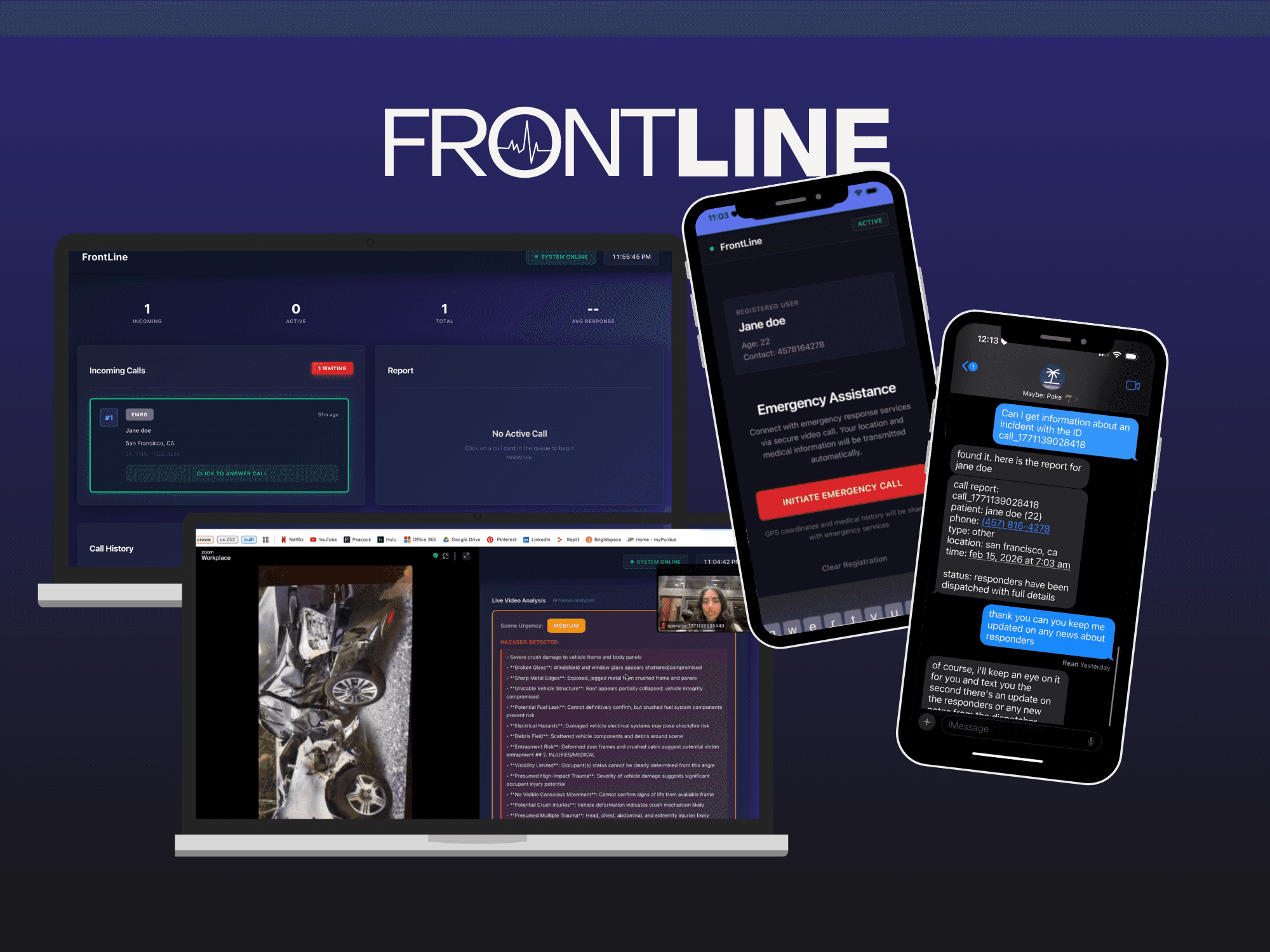
Video-First Emergency Calls
Allows callers to connect with dispatchers through live video, providing immediate visual context of the emergency scene.
Real-Time Computer Vision
Analyzes frames from the Zoom video stream to extract environmental signals that may indicate hazards or medical issues. Based on what the user is showing, the operator doesn't have to focus on documenting and instead be present with the caller.
AI-Generated Incident Reports
Combines audio transcripts and computer vision insights to generate structured reports for responders. Post call, the reports are downloadable for future reference. The caller or the caller's associates has the ability to request details of the report using on Poke assistant.
Operator Dashboard
A centralized interface that displays active calls, live video feeds, and AI-generated insights in real time. Operators have the ability to accept calls and see a real time queue of incoming calls. Shows basic statistics like average call response time, incoming, total, and active.
iOS App
Emergency call platform built from swift to send call requests to the operator dashboard. Users had the ability to input basic information (name, birthdate, health concerns) when setting up the app which would auto send to the operator dashboard.
Video-First Calls
Real-Time Computer Vision
AI Incident Reports
Operator Dashboard
iOS App
CHALLENGES
Zoom Video SDK Integration
Embedding the Zoom Video SDK required careful handling of authentication, session management, and real-time video streams.
Real-Time AI Processing
Ensuring that computer vision analysis could run without interrupting the live video experience required balancing processing speed and system responsiveness.
Coordinating Multiple APIs
Integrating several external services—including Claude, Perplexity, and Zoom—required careful orchestration of asynchronous API calls.
IMPACT
Although FrontLine was built as a hackathon prototype, it demonstrates how emerging technologies can improve the earliest stages of emergency response.
Potential impact includes:
reducing dispatcher workload during critical moments
improving situational awareness for emergency responders
accelerating the transfer of key information during emergencies
By combining video communication with AI-generated insights, the system helps responders make faster and more informed decisions.
FUTURE OPPORTUNITIES
Scene-Specific Computer Vision Models
Train models to detect medically relevant cues such as bleeding, unconsciousness, or abnormal body posture.
Temporal Scene Analysis
Track changes in the environment over time rather than analyzing individual frames independently.
Low-Bandwidth Optimization
Develop adaptive video processing methods that work reliably in poor network conditions.
Privacy-Preserving AI
Move computer vision processing to on-device or edge-based systems to protect sensitive visual data.
REFLECTION
FrontLine demonstrated how quickly a team can prototype meaningful solutions when combining modern APIs, AI systems, and real-time communication tools.
Working within a hackathon environment required rapid decision-making, cross-disciplinary collaboration, and constant iteration.
The project reinforced the importance of designing systems that support users during high-stress situations—where clarity, speed, and reliability matter most.
ARISHA GUPTA © 2026 — SEATTLE, WA